Design engineering case study / Output.ai application
Output Conductor
A real-time workflow observatory for Output.ai. This is both a functional prototype and a written case for why
I'm the right design engineer for Output — covering my story, how I think about the craft, and the product I'd build.
I build things that make complexity disappear. The thread running through my career is a refusal to accept that
powerful tools must be hard to use. I've shipped production interfaces for data platforms, AI systems, and developer
tools — and in every case, the challenge wasn't making something work, it was making something that feels
effortless while doing genuinely hard things under the hood.
How I Think About Design Engineering
Design engineering lives at the exact intersection where system architecture meets human attention. It's not
"frontend that looks good" — it's the discipline of encoding complex domain logic into spatial, temporal, and visual
patterns that a person can parse in milliseconds.
Principles in practice
Performance is a design decision. When rendering 2,000 trace entries, virtualization isn't a technical optimization — it's a UX decision that determines whether your tool feels alive or dead. I reach for @tanstack/react-virtual the same way a designer reaches for whitespace.
Animation communicates state. A panel sliding in at 200ms says "this is a child of what you just clicked." A pulse on a status dot says "this is still happening." These aren't decorations — they're information channels.
Progressive disclosure is respect. Not everyone needs LLM token counts at first glance. But the engineer debugging a failed workflow at 2am absolutely does. The art is layering information so both users feel served.
Type safety is design infrastructure. When every workflow execution, step, trace, and evaluation has a typed interface, the component tree becomes self-documenting. TypeScript isn't overhead — it's the contract between data and pixels.
What I've Built
160+ component design system — Microsoft Fabric UX Web Components with Angular and React wrappers for enterprise Power BI migration.
Agentic AI design-to-code tooling — Figma intake, component parity checking, migration planning, and issue preparation for Fabric UX adoption.
Visualization systems that render thousands of data points with sub-16ms frame times using virtualization and canvas rendering.
Real-time monitoring interfaces with WebSocket-driven state, optimistic updates, and animated transitions that make live data feel tangible.
Developer tools where the interface itself teaches you the underlying system — where the UI is the documentation.
Why Output
The gap between "your workflow ran" and "you understand what happened" — that's a design engineering problem.
It's my problem. It's the exact kind of problem I get out of bed to solve.
The fit
Output.ai is building the infrastructure layer for AI workflows — Temporal-backed orchestration, multi-provider LLM
abstraction, durable execution with full tracing. That's an incredible foundation. But infrastructure only realizes
its value when developers can see what's happening inside it. You're building the Rails of AI workflows,
and Rails needed a console, a profiler, and a way to understand what's happening. You need someone who can design
those experiences with the same rigor that went into the execution engine. That's me.
Part 2: A Product I'd Build — Conductor
Conductor is the missing observability layer that transforms Output's JSON trace logs into a visual,
interactive debugging experience. Today, Output stores rich execution data — every LLM call, HTTP request, evaluator
result, retry, and cost — in logs/runs/ as JSON files. Claude Code can analyze them. But humans need
something faster. They need to glance at a dashboard and know: Are my workflows healthy? What's failing? What's
expensive? Where should I look?
Conductor answers those questions in milliseconds.
Who It's For
AI engineers in development — iterating on workflows, checking if prompt changes improved evaluator scores, debugging why a step is retrying.
Team leads — monitoring cost trends across workflows, catching anomalies before they become incidents.
New Output users — learning how the framework works by watching their workflows execute step by step, with every trace visible and explained.
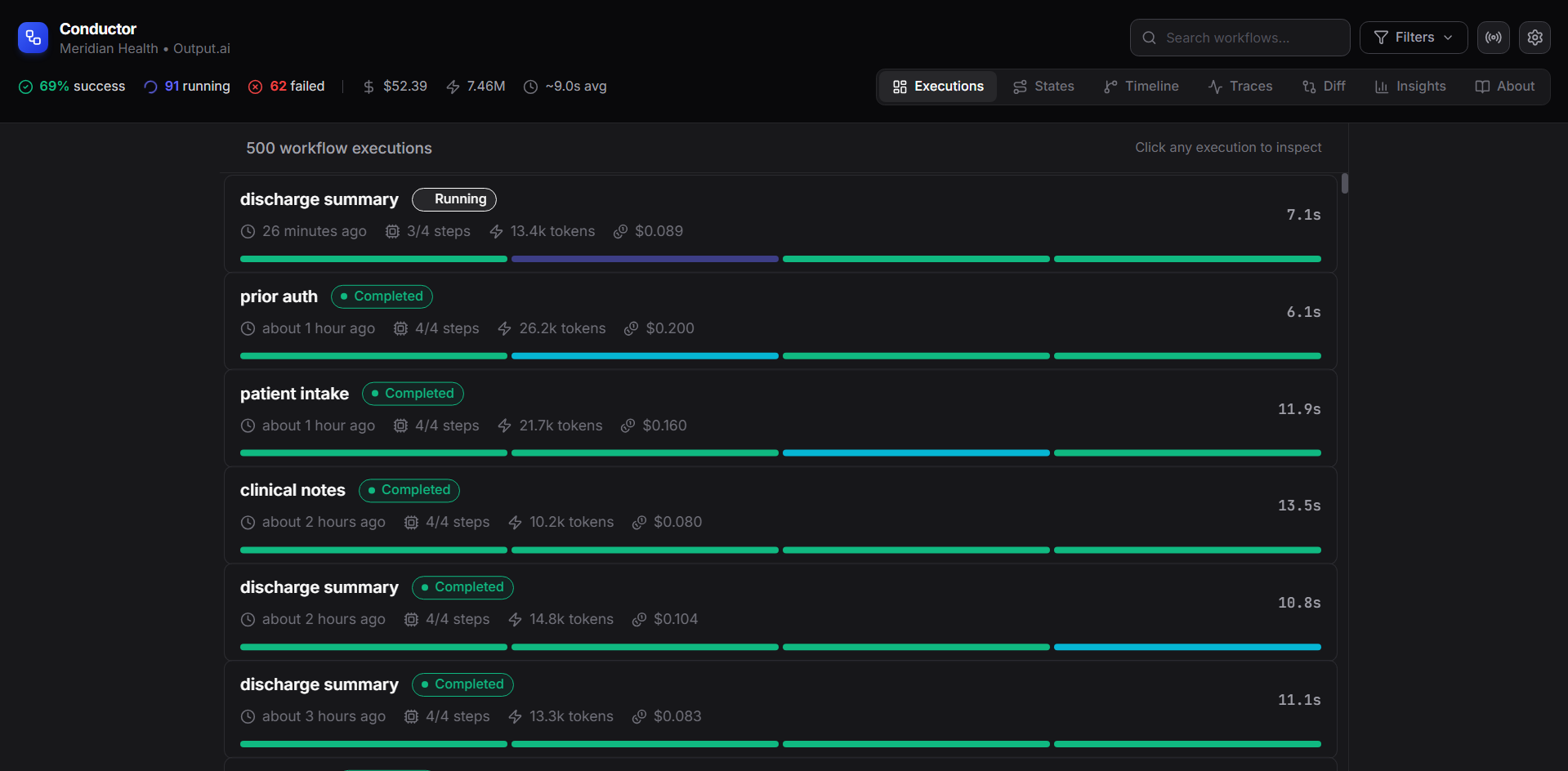
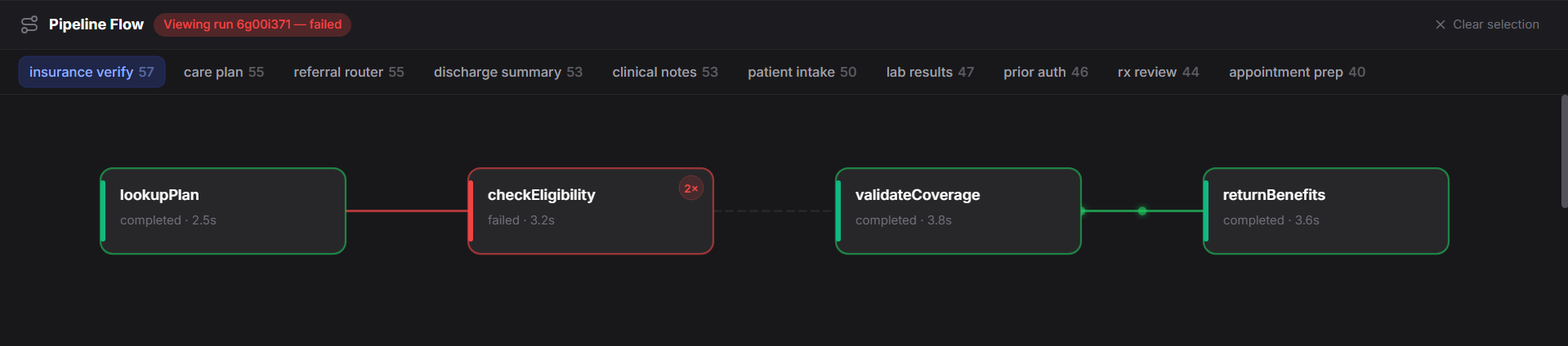
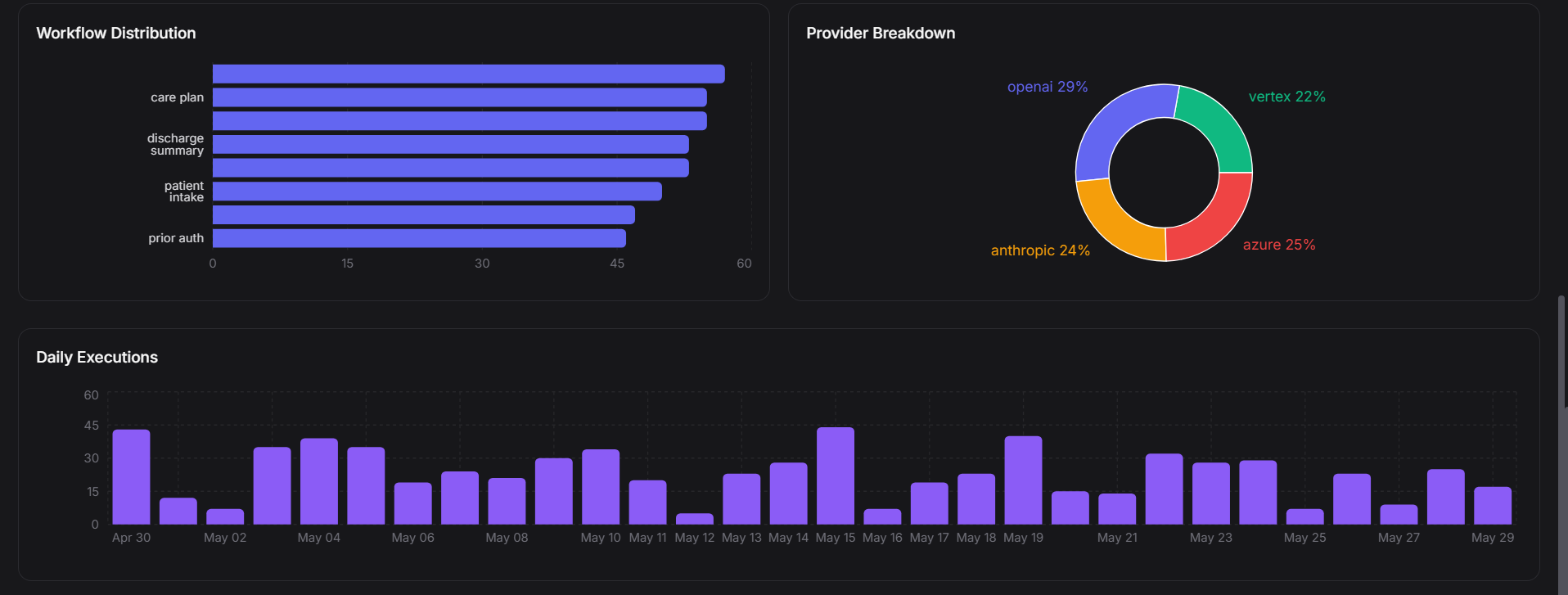
Virtualized execution feed — real-time status, cost, and step progress at a glancePipeline flow — step-level debugging with retry badges and failure statesAnalytics — workflow distribution, provider breakdown, daily execution trends
The Experience: Execution Feed
The primary view is a real-time feed of workflow executions sorted by recency. Each card shows the workflow name with a
status badge (pulse animation for running), step completion as a segmented progress bar, key metrics (duration, tokens,
cost), and relative time. The list is virtualized — rendering only visible items. You scroll through
500+ executions at 60fps using @tanstack/react-virtual with 10-item overscan.
Split-Pane Detail Inspector
Click any execution and the detail panel slides in from the right, animated with Framer Motion. The list compresses
to 50% width. Inside: a metrics bar (duration, tokens, cost, model), a step timeline with connection lines and
status-colored borders, inline trace expansion showing every LLM call's model/tokens/cost, and evaluator results
with pass/fail, confidence scores, and the LLM judge's reasoning. Progressive disclosure — steps show summary by
default. Expand for traces. Expand further for prompt/response pairs. You never see more than you need.
Timeline Swimlanes
A Gantt-chart-inspired view where workflows are grouped into horizontal lanes by type. Each execution appears as a
colored bar positioned along a time axis. You can instantly see which workflows run most frequently, cluster patterns
(are your newsletter digests all firing at the same time?), and duration distribution (long bars = slow executions
worth investigating). Hover for details. Click to jump to execution detail.
Trace Table
A flat, filterable table of every trace across all executions. 2,000+ rows, virtualized. Columns: type (color-coded
badge), name, workflow, step, duration, status. Filter by trace type to find all LLM calls, or all failed HTTP
requests, or all evaluator invocations. This view is for the engineer who knows something is wrong and needs to find
it fast.
Execution flow
Pipeline to insight.
Workflow executions stream in, each step is traced, costs are aggregated, evaluators run their checks,
and the developer gets a clear picture without switching context.
Ingest
Executions stream in
Workflow runs arrive with full step graphs and metadata.
Trace
Every call is logged
LLM calls, HTTP requests, tool invocations, and evaluator results.
Render
Virtualized display
Only visible rows render — thousands of items stay smooth.
Analyze
Costs and trends
Recharts surfaces cost trends, provider breakdown, and daily patterns.
Debug
Drill into failures
Expand any step to inspect retries, cache hits, and evaluator output.
Design Principles Applied
Information density without overwhelm. Every view packs significant data into the viewport, but uses whitespace, typography hierarchy, and color coding to keep it scannable. The zinc-950 dark theme with emerald/indigo/red/amber creates instant pattern recognition.
Performance as a feature. Virtualization means the app stays responsive regardless of data volume. No pagination. No "load more." Just scroll. Pagination breaks flow state — this is a deliberate design choice.
Consistency breeds learnability. The same status colors, badge components, and metric formatting appear everywhere. Learn it once in the execution list, recognize it instantly in the trace table.
Animated transitions as wayfinding. When you click an execution, the detail panel animates in and the list compresses. This spatial metaphor tells you where the detail came from and how to dismiss it.
Analytics Dashboard
Cost over time — stacked area chart showing input cost vs output cost trends.
Workflow distribution — horizontal bar chart showing which workflows run most.
Provider breakdown — donut chart showing Anthropic vs OpenAI vs Azure usage.
Daily execution volume — bar chart with trend visibility.
Connect to Output's logs/runs/ directory via file watcher or API.
Real-time streaming of running workflow updates via WebSocket.
Prompt diff visualization for A/B testing prompt versions.
Evaluator trend charts — is quality improving over time?
Ship as an optional @outputai/conductor package that hooks into npx output dev.
The Thread
Output.ai is building the framework that makes AI workflows professional, durable, and observable from day one.
Conductor is the visual layer that makes that observability human — not just machine-readable traces,
but spatial, temporal, interactive understanding.
That's what I do. I take systems with incredible depth and give them surfaces that invite exploration. I make
complex things feel simple without losing any of the power underneath. I want to do that for Output.